Angel One Trade Copier: How to Copy Trades Across Multiple Accounts

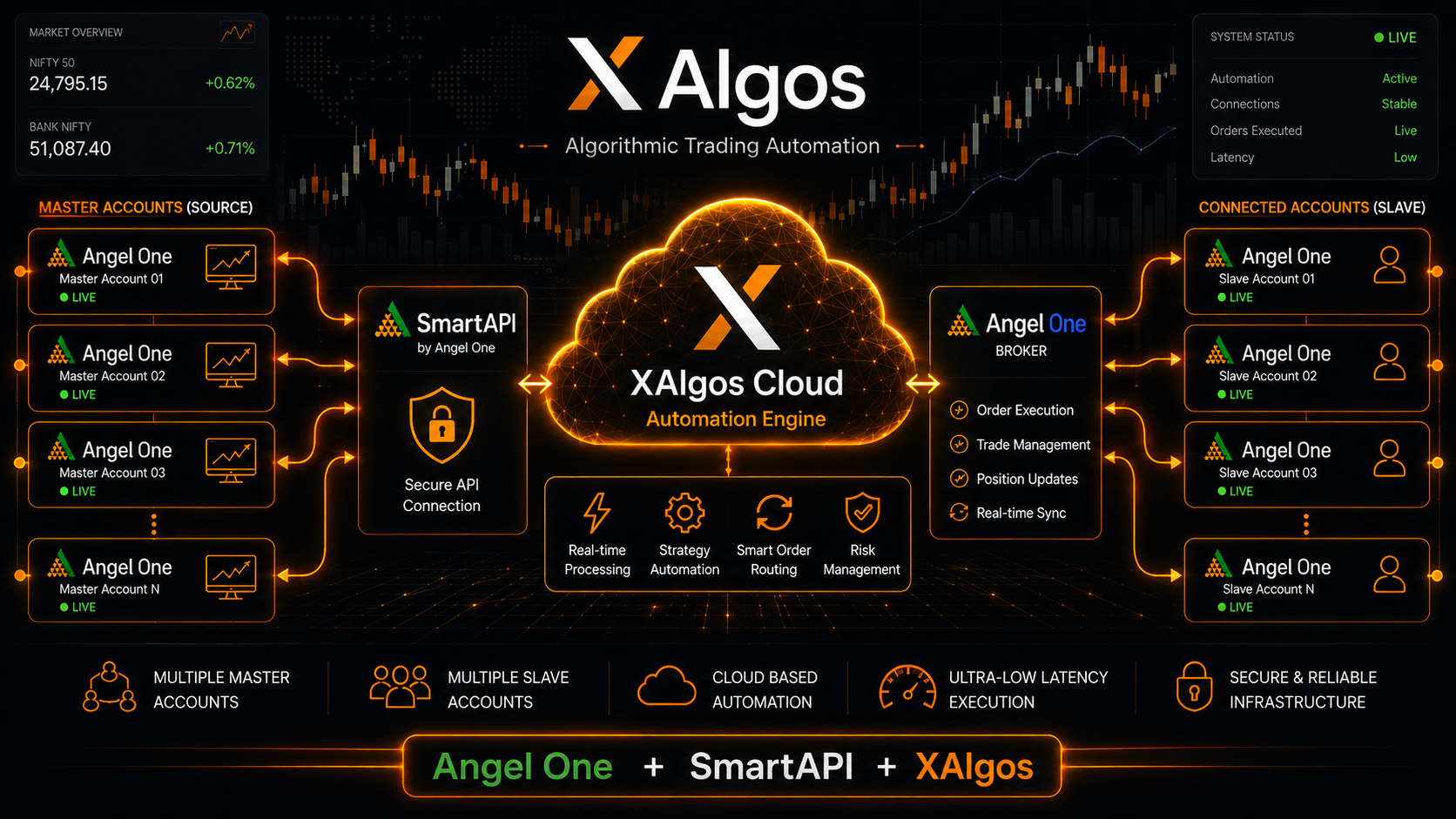
Angel One Trade Copier Using SmartAPI: Complete Guide to Automated Multi-Account Trading
An Angel One Trade Copier allows traders to automate the replication of supported trading activity across connected Angel One accounts using the broker's SmartAPI infrastructure. Instead of manually entering the same order across multiple accounts, a configured automation workflow can receive trading instructions and send them to connected accounts through the API.
XAlgos brings this workflow into a centralized automation environment, allowing traders to configure supported multi-account trading workflows, manage trade-copying rules, and connect automated strategies with Angel One through SmartAPI.
This guide explains how an Angel One SmartAPI trade copier works, how multi-account copying is structured, what features matter when choosing a copier, and how XAlgos can be used as part of an automated Angel One trading workflow.
⚡ Angel One Trade Copier at a Glance
Angel One
Angel One SmartAPI
XAlgos
Multi-account automated trade copying
API-based trade execution
Supported within XAlgos automation workflows
📑 Table of Contents
💡 Quick Answer
An Angel One Trade Copier is an automated system that can replicate supported trading instructions across connected Angel One accounts using SmartAPI. XAlgos provides the automation layer for configuring supported trade-copying workflows, allowing traders to reduce repetitive manual order entry and manage multiple trading accounts through a centralized system.
What Is an Angel One Trade Copier?
An Angel One Trade Copier is designed to automate the process of sending trading instructions from a source strategy or account to one or more connected Angel One accounts.
For a trader managing multiple accounts, manually entering the same order repeatedly can be inefficient. A trade-copying workflow instead uses automation to process the source trade and submit the corresponding supported instruction to the connected destination accounts.
With XAlgos, the workflow can be configured around supported account connections, trade-copying rules, position sizing, symbol mapping, filtering, and other automation settings.
Why Use a Trade Copier?
The main purpose is to reduce repetitive manual execution. Instead of independently entering the same trade into multiple accounts, the configured automation workflow can distribute supported trading instructions according to predefined rules.
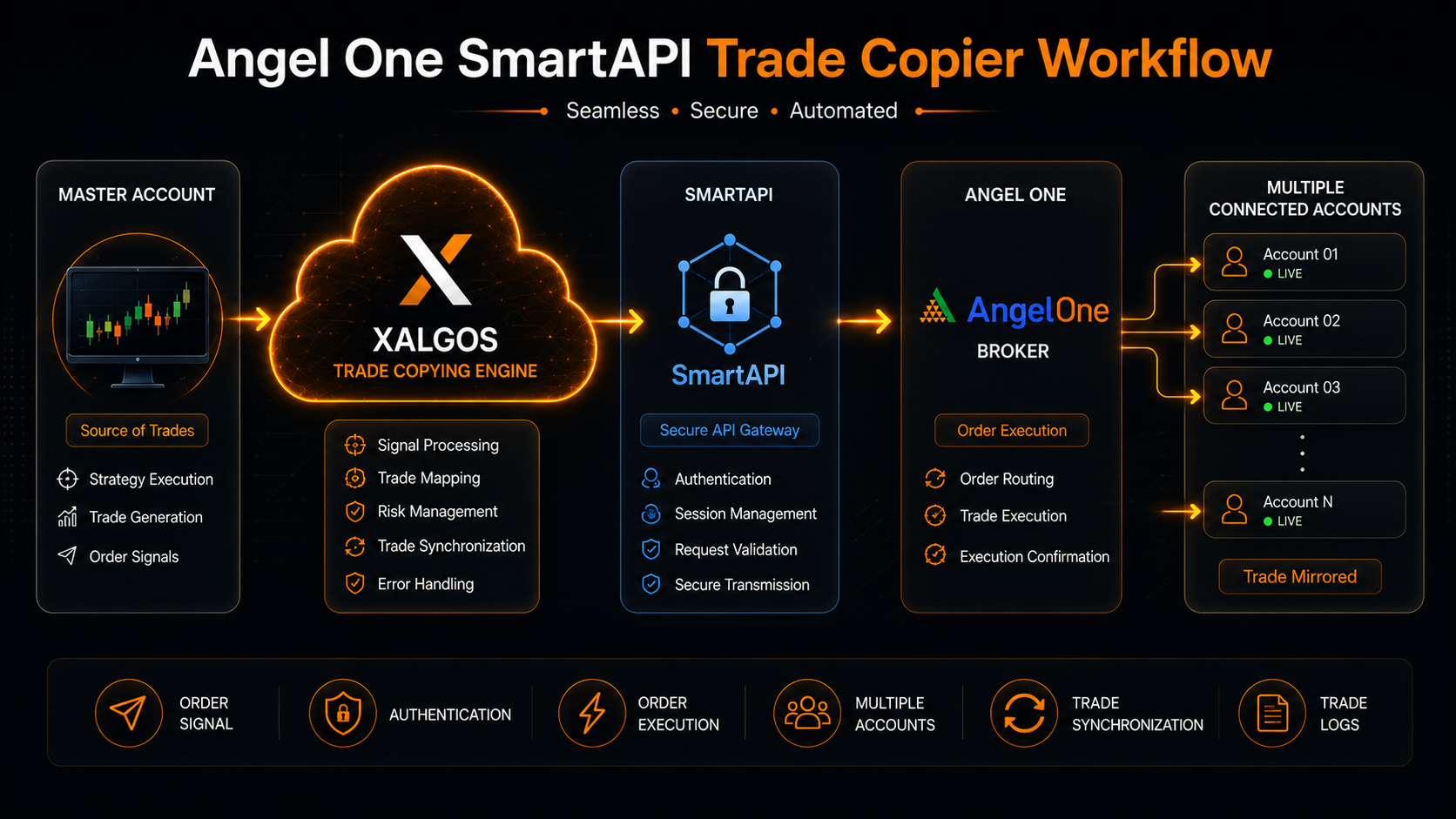
Angel One SmartAPI Trade Copier Architecture
The architecture illustrates the relationship between the trading strategy, XAlgos automation, SmartAPI connectivity, and the connected Angel One trading accounts.
What Is Angel One SmartAPI?
SmartAPI is the API infrastructure provided by Angel One that enables software applications to interact programmatically with supported trading and account functions.
For automated trading workflows, an API provides a bridge between software and the broker's trading environment. Instead of relying entirely on manual interaction with a broker application, an authorized application can communicate with the broker through supported API functionality.
XAlgos uses this type of API-based connectivity as part of its supported Angel One automation workflow, allowing trade-copying instructions to be processed and sent to connected accounts.
API-based automation does not remove market risk. Order execution remains subject to the broker, exchange, instrument, market conditions, account configuration, and other factors affecting live trading.
How Does an Angel One Trade Copier Work?
An Angel One trade copier works by receiving a supported trading instruction from a source strategy or account, processing the configured copying rules, and sending the resulting instruction to connected Angel One accounts through the supported SmartAPI workflow.
This approach is useful for traders who want to copy trades to multiple Angel One accounts without manually entering the same order in every account. Instead of repeating the process account by account, the automation layer handles the configured workflow centrally.
Source Signal
A supported strategy or source account generates the trading instruction.
XAlgos Processing
XAlgos receives the supported instruction and applies the configured copying rules.
SmartAPI Connection
The configured Angel One connection communicates with the broker through SmartAPI.
Account Execution
The resulting supported order instruction is sent to the connected Angel One account or accounts.
Copy Trades Across Multiple Angel One Accounts
One of the main reasons traders look for an Angel One multi-account trade copier is the need to manage more than one trading account without repeating every order manually.
With a configured XAlgos workflow, a source trading instruction can be distributed to connected accounts according to the rules you've selected. This can be useful when managing multiple personal accounts, strategy accounts, or other supported trading setups.
Example Workflow
Source trading instruction
Copying rules and account management
Account 1
Account 2
Account 3
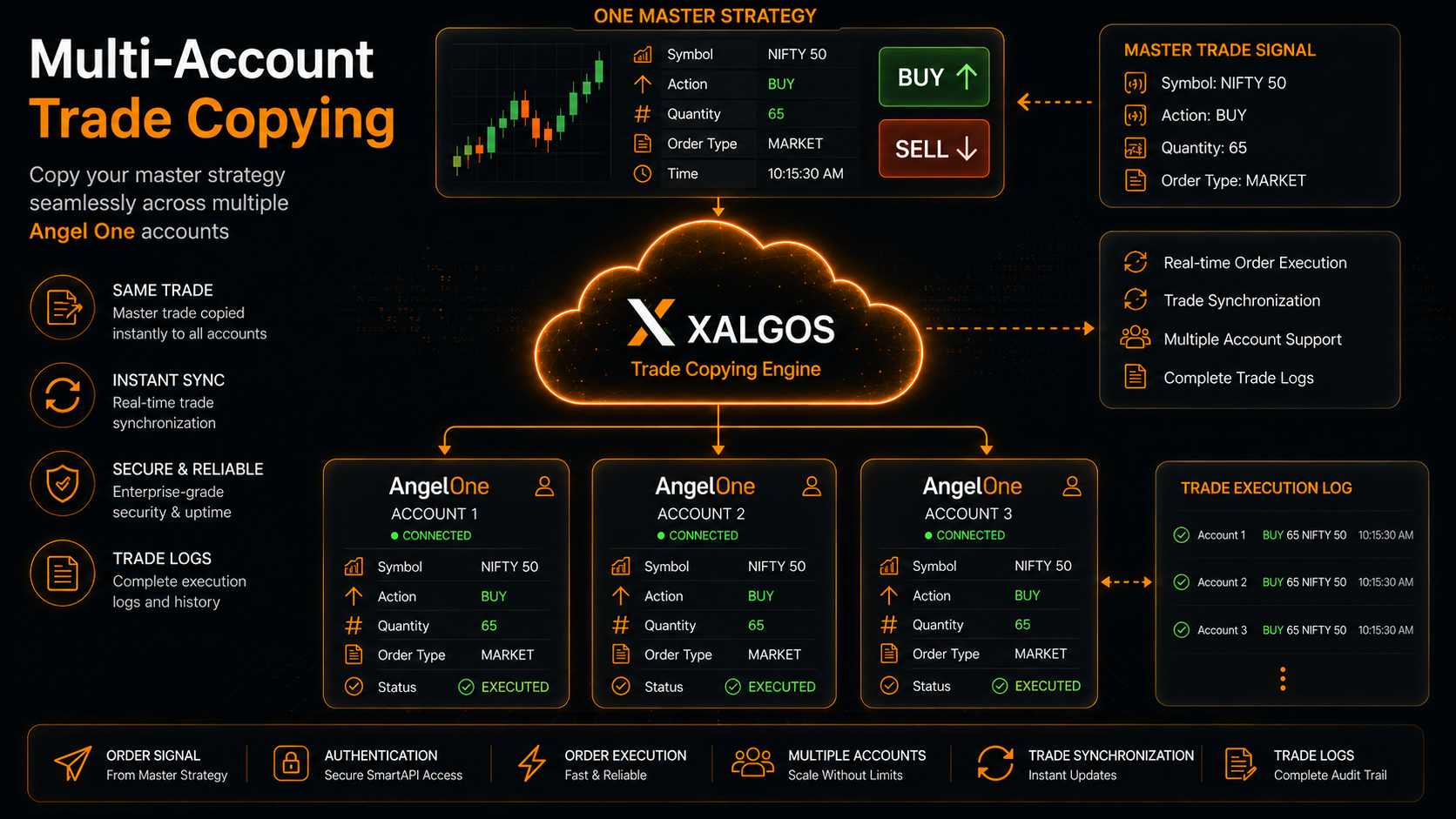
Multi-account Angel One trade copying workflow using XAlgos and SmartAPI.
Control How Trades Are Copied
A useful trade copier needs more than a simple copy button. Different accounts may require different position sizes, symbols, or trade filters. XAlgos provides configurable controls that can be used to adapt supported trade-copying workflows to different account requirements.
📏 Lot Multiplier
Scale copied trade quantities according to your configured multiplier.
🔢 Fixed Lot Mode
Use a defined lot size for supported copied trades instead of matching the source quantity.
🔀 Symbol Mapping
Map different instrument naming conventions between connected trading environments.
🛑 Trade Filtering
Apply supported filtering rules to control which trading activity is copied.
🟢 BUY / SELL Filtering
Configure supported workflows to copy only BUY or only SELL trading activity.
🔢 Magic Number Filter
Filter supported automated trades using specific magic numbers.
What Trading Actions Can Be Synchronized?
Depending on the configured workflow and supported order type, an Angel One SmartAPI trade copier can be used to automate more than the initial order instruction.
📈 New Trades
Copy supported new trade instructions to connected accounts.
⏳ Pending Orders
Supported pending order activity can be synchronized according to configuration.
🛡 Stop Loss
Supported Stop Loss instructions can be synchronized between connected workflows.
🎯 Take Profit
Supported Take Profit instructions can be synchronized according to the configured setup.
✂️ Partial Close
Supported partial position closures can be replicated across connected accounts.
🔴 Close Orders
Supported closing instructions can be synchronized across connected accounts.
Angel One Automated Trading With SmartAPI
Angel One automated trading allows software to interact with supported broker functionality through an API instead of relying entirely on manual order entry. This makes API connectivity useful for traders who want to build systematic trading and multi-account execution workflows.
With XAlgos, SmartAPI can form the connection between the automation platform and supported Angel One accounts. A configured strategy can generate a trading instruction, XAlgos can process the applicable rules, and the supported instruction can then be sent through the Angel One API connection.
This is particularly useful when a trader wants to combine Angel One API trading with automated strategies, multi-account execution, or TradingView-based alerts.
⚡ Automated Instructions
Reduce repetitive manual order-entry steps by using a configured API-based workflow.
🔗 API Connectivity
Connect supported Angel One trading workflows through SmartAPI.
👥 Multi-Account
Manage supported trade-copying workflows across connected Angel One accounts.
TradingView to Angel One Trade Copier
A common automation workflow is TradingView to Angel One, where a TradingView alert can become part of an automated execution process. XAlgos provides TradingView automation capabilities that can connect supported alert workflows with supported trading destinations.
Instead of manually watching a TradingView chart and then entering an order into Angel One, the workflow can be configured so that the signal is processed by XAlgos and passed through the supported Angel One SmartAPI connection.
TradingView → XAlgos → SmartAPI → Angel One
Strategy / Alert
Automation Layer
API Connection
Supported Execution
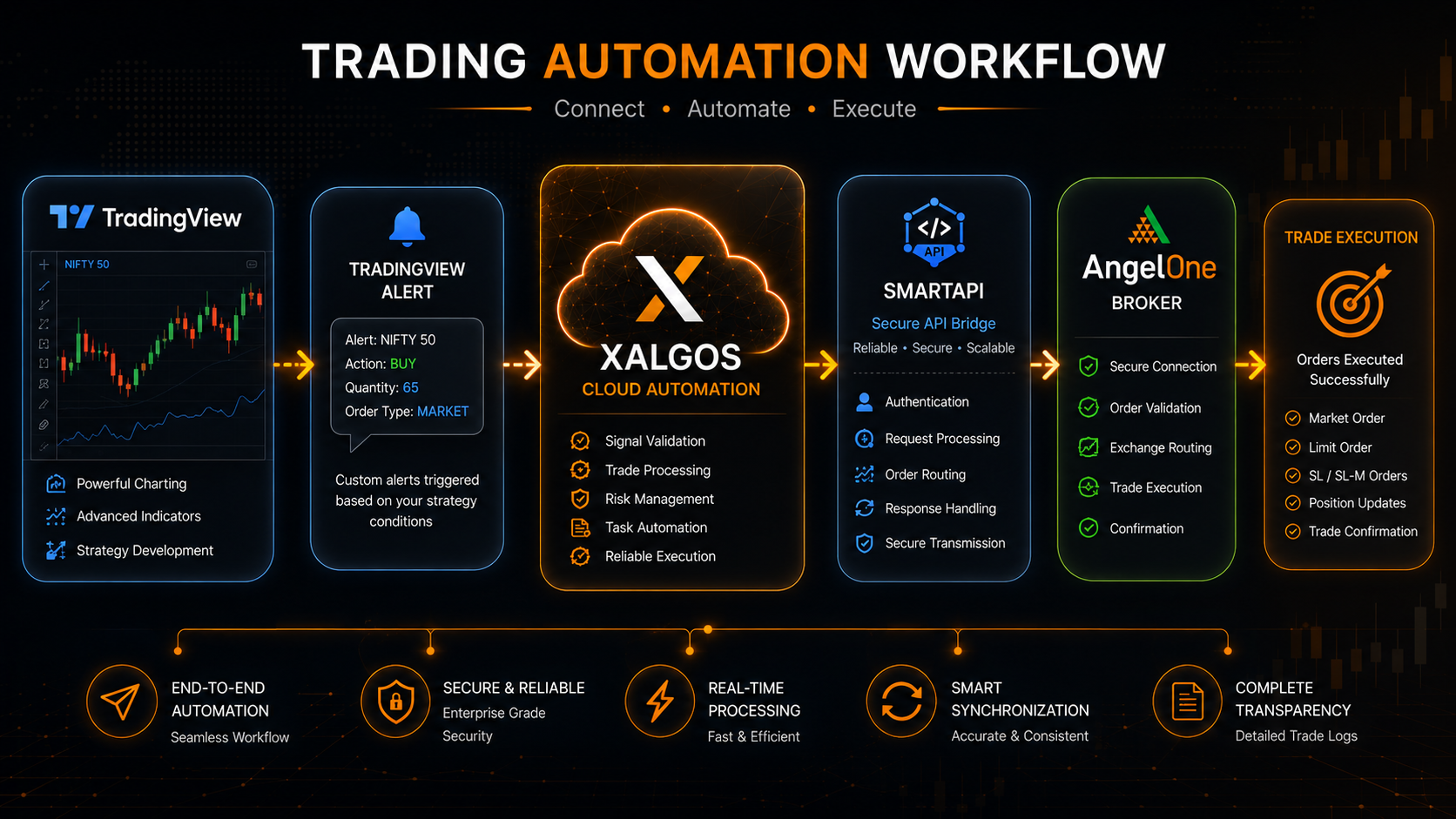
TradingView to Angel One automation workflow through XAlgos and SmartAPI.
Angel One Options and Futures Trade Copying
Traders searching for an Angel One options trade copier or Angel One futures trade copier are often looking for a way to reduce repetitive execution across multiple accounts.
An automated workflow can be useful when the same strategy needs to be implemented across connected accounts. However, instrument selection, contract specifications, quantity, account permissions, exchange rules, and broker-side execution conditions must always be considered before using automation in live markets.
📊 Options
Use supported automation workflows for options strategies while accounting for contract and quantity differences between accounts.
📈 Futures
Configure supported futures trading workflows while considering contract specifications and account-level requirements.
⚠ Risk Controls
Always verify quantity, instrument mapping, account settings, and execution behavior before using automated live trading.
Who Can Use an Angel One Trade Copier?
An Angel One copy trading workflow can be useful in several situations where the same supported strategy or trading instruction needs to be managed across multiple accounts.
👤 Individual Traders
Manage supported strategies across multiple accounts without repeatedly entering the same instructions.
🤖 Algo Traders
Connect supported algorithmic trading workflows with automated Angel One execution.
📊 Strategy Developers
Use supported automation workflows when distributing a strategy across connected accounts.
📡 Signal Workflows
Use supported signal-driven workflows to automate trade instructions across connected accounts.
Why Use XAlgos for Angel One Trade Copying?
Choosing an Angel One trade copier is not only about sending an order from one account to another. A practical automation platform also needs account management, configurable position sizing, filtering, trade monitoring, and reliable connectivity.
XAlgos combines these capabilities into a centralized automation platform. Traders can configure supported Angel One SmartAPI connections while managing their trade-copying rules and other automated trading workflows from one environment.
This makes XAlgos suitable for traders looking for an Angel One SmartAPI trade copier, multi-account automation, or a broader algorithmic trading workflow rather than a basic one-to-one copying tool.
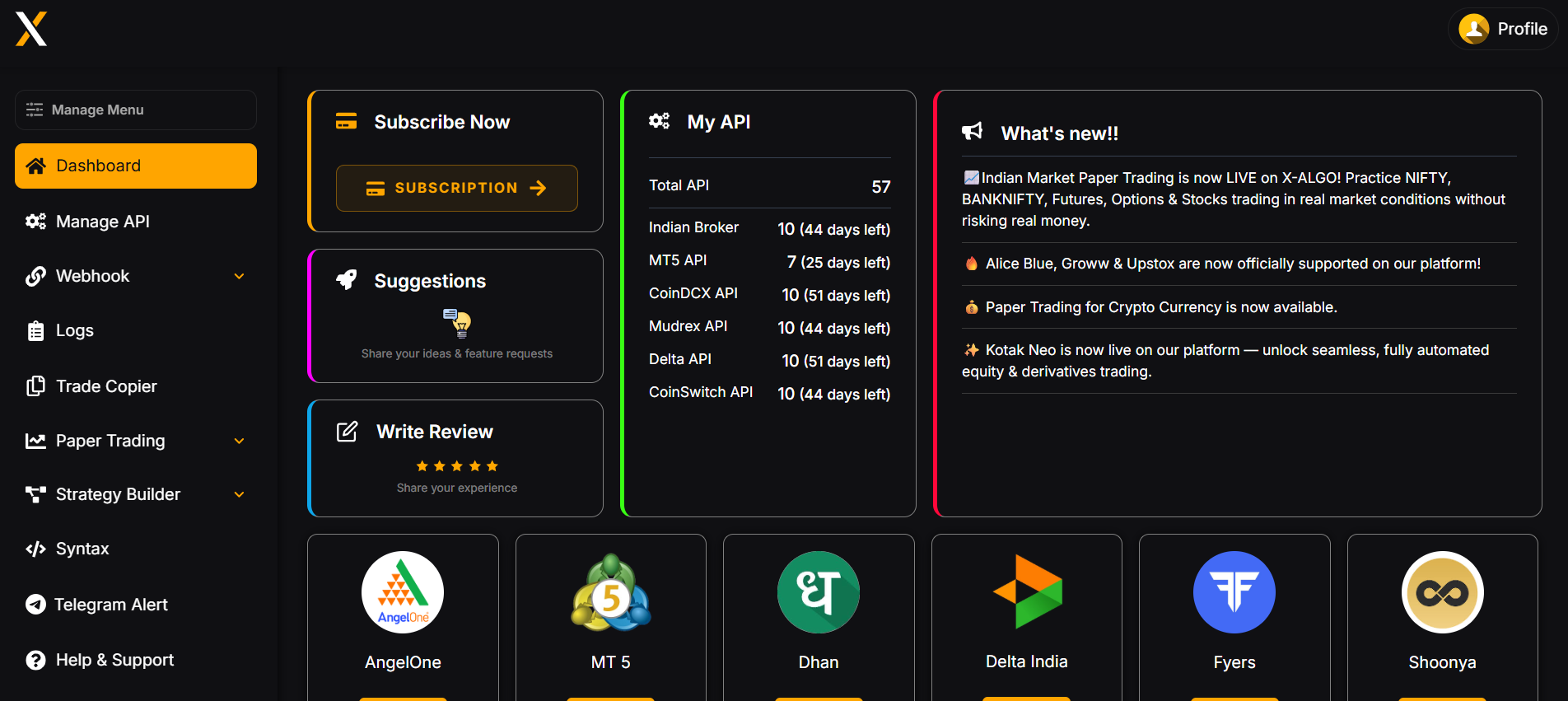
XAlgos platform interface for managing supported automated trading workflows.
XAlgos Features for Automated Trade Copying
A good Angel One trade copying software workflow needs enough flexibility to handle different account sizes, instruments, strategies, and execution requirements. XAlgos provides a range of configuration options for supported automation workflows.
⚡ Real-Time Trade Copying
Copy supported trading instructions across connected accounts without repeatedly entering the same order manually.
👥 Multiple Accounts
Configure supported workflows for distributing trading activity across multiple connected accounts.
📏 Lot Multiplier
Scale copied quantities using a configured multiplier when different accounts require different position sizes.
🔢 Fixed Lot Mode
Configure a fixed lot size for supported copied trades instead of directly matching the source quantity.
🔀 Symbol Mapping
Map instrument names between connected trading environments when symbol conventions differ.
🎯 Trade Filtering
Use supported filtering controls to determine which trading activity should be copied.
🟢 BUY / SELL Filtering
Restrict supported copying workflows to BUY or SELL activity according to your configuration.
🔢 Magic Number Filter
Use magic-number filtering to identify supported automated trading activity.
📋 Trade Logs
Review copied trading activity, including supported trade information and execution status.
🔄 Auto Reconnect
Supported connections can automatically attempt to recover when a connection interruption occurs.
⏳ Pending Order Copying
Copy supported limit and stop order activity according to the configured workflow.
🛡 SL & TP Synchronization
Synchronize supported Stop Loss and Take Profit changes across connected workflows.
More Than Simple Copy Trading
A modern Angel One API trade copier should give traders control over how trading instructions are handled. XAlgos is designed around configurable workflows rather than a single fixed copying method.
🔄 Reverse Copying
Supported workflows can be configured to reverse copied trading directions where appropriate.
✂️ Partial Close Support
Supported partial position closures can be replicated across connected accounts.
✏️ Modify Order Syncing
Supported modifications to active orders can be synchronized according to configuration.
📡 Multiple Masters
Configure supported workflows that consolidate trading activity from multiple source accounts.
📚 Explore XAlgos Automation
If you're exploring Angel One algorithmic trading, TradingView automation, or multi-account trade copying, you can learn more about the XAlgos platform and its supported automation workflows here:
Explore the Algo Trading Platform →