MT5 Trade Copier: Copy Trades from Read-Only Accounts, TradingView & Multiple MT5 Accounts
By XAlgos Team ·

MT5 Trade Copier: Copy Trades from Read-Only Accounts, TradingView & Multiple MT5 Accounts
Everything you need to know about MT5 Trade Copier, Forex Trade Copier, TradingView automation, investor password copying, and professional multi-account trading.
⚡ Quick Summary
- Learn how MT5 Trade Copier works.
- Copy trades from Read-Only (Investor Password) MT5 accounts.
- Automate TradingView alerts with MT5.
- Manage unlimited follower accounts.
- Reduce execution errors and improve consistency.
- Discover why professional traders choose XAlgos.
📑 Table of Contents
- What is MT5 Trade Copier?
- How MT5 Trade Copier Works
- Benefits of Trade Copying
- Copy Trades from Read-Only Accounts
- TradingView to MT5 Automation
- Supported Brokers
- Why XAlgos?
- Frequently Asked Questions
- Conclusion
Start Automating Your Trading Today
Connect MT5, TradingView, and multiple broker accounts with XAlgos and automate your trading in minutes.
Why Every Professional Trader Needs an MT5 Trade Copier
Managing multiple MetaTrader 5 accounts manually is one of the biggest challenges for active traders. Whether you're a Forex trader, prop firm participant, portfolio manager, or signal provider, repeating the same trade across several accounts is time-consuming and increases the chance of execution mistakes. A single missed trade or incorrect lot size can affect the consistency of your entire strategy.
An MT5 Trade Copier solves this problem by automatically copying trades from one master account to one or more follower accounts in real time. Every new order, stop-loss update, take-profit modification, and closed position can be synchronized according to your preferred risk settings, allowing you to manage multiple trading accounts with confidence.
What makes XAlgos different is its ability to go beyond standard trade copying. In addition to supporting traditional master-to-follower copying, XAlgos can also monitor and copy trades from MT5 Read-Only (Investor Password) accounts. Combined with TradingView webhook automation and support for multiple broker integrations, it provides a complete solution for traders looking to automate and scale their trading operations.
What is an MT5 Trade Copier?

An MT5 Trade Copier is software that automatically replicates trades from a master MetaTrader 5 account to one or more follower accounts. Instead of manually placing the same order multiple times, every trading action is copied automatically, helping traders save time, reduce errors, and maintain consistent execution across all connected accounts.
Always test your trade copier on a demo account before using it with live funds. This allows you to verify lot sizing, symbol mapping, and risk settings without exposing your capital.
Copy Trades from Read-Only MT5 Accounts
One of the biggest advantages of XAlgos MT5 Trade Copier is its ability to copy trades directly from an MT5 Read-Only (Investor Password) account. This feature allows traders to follow trading activity without requiring access to the master account's trading password.
Traditional trade copiers usually require full login credentials for the master account. XAlgos provides a more flexible approach by monitoring trading activity through the investor password and copying those trades automatically according to your configured risk settings.
Why Read-Only Copying is Powerful
🔒 Better Security
Monitor trading activity without sharing full trading credentials.
📈 Signal Providers
Follow professional traders while keeping your own account independent.
🏢 Prop Firms
Track approved trading accounts while maintaining separate execution accounts.
👨💼 Portfolio Managers
Replicate verified strategies across multiple managed accounts.
Suppose a professional trader shares an MT5 Investor Password for a verified trading account. Using XAlgos, you can monitor that account and automatically copy eligible trades to your own MT5 account without needing the trader's main password.
TradingView to MT5 Automation
TradingView has become one of the world's most popular charting platforms. XAlgos allows traders to connect TradingView alerts with MetaTrader 5, reducing manual work and helping automate trading strategies.
When a TradingView alert is triggered, it can be sent through a secure webhook to XAlgos. XAlgos processes the alert and forwards it to your connected trading environment according to your configured automation rules.
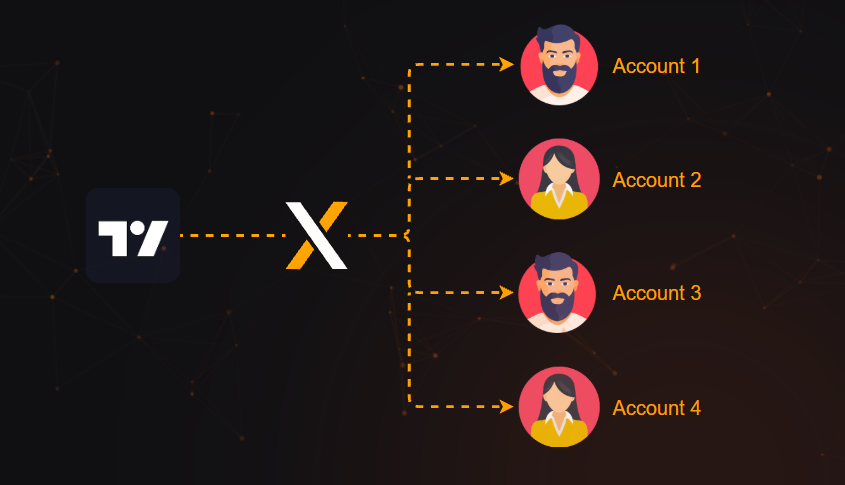
TradingView Alerts → XAlgos → Broker → MT5
TradingView Workflow
- Create a TradingView strategy.
- Configure TradingView Alerts.
- Send alerts using Webhooks.
- XAlgos validates the request.
- Trade instructions are processed.
- Your connected trading setup receives the execution request.
Supported Broker Integrations
XAlgos is designed to work with MetaTrader 5 while supporting integrations with popular trading platforms and broker APIs. This flexibility allows traders to automate strategies across different ecosystems from a single dashboard.
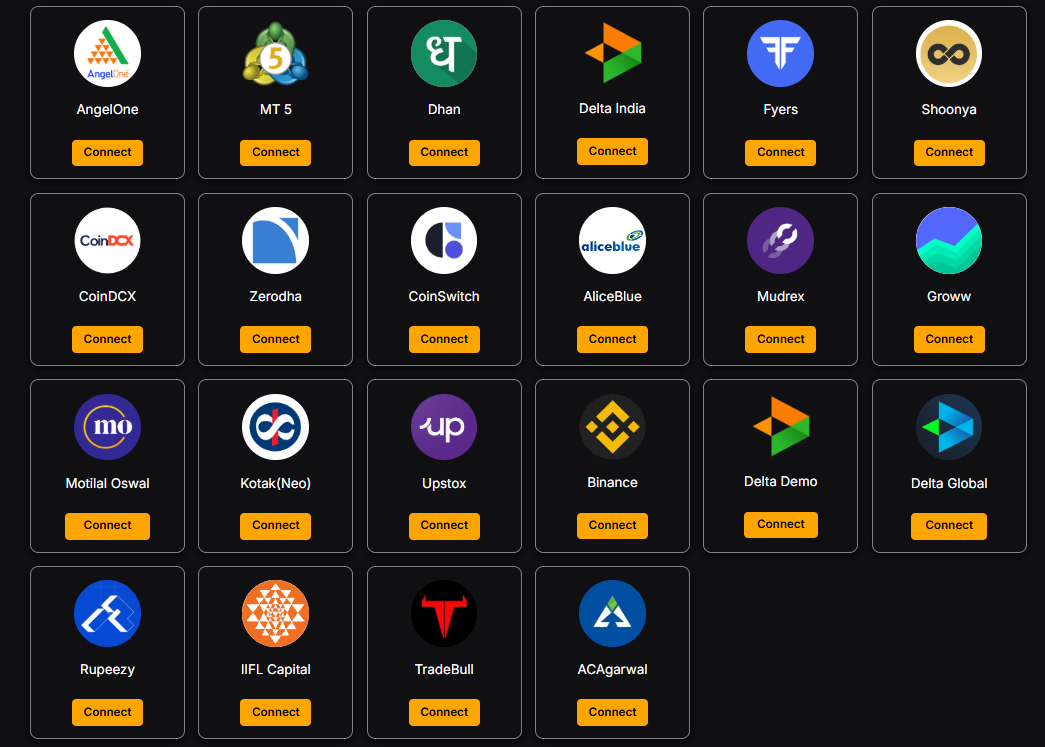
| Platform | Integration | Automation |
|---|---|---|
| MetaTrader 5 | Supported | Yes |
| TradingView | Webhook | Yes |
| Dhan API | Supported | Yes |
| Angel One API | Supported | Yes |
| Zerodha API | Supported | Yes |
| Fyers API | Supported | Yes |
| Upstox API | Supported | Yes |
MT5 Trade Copier vs Manual Trading
Managing multiple trading accounts manually may work when you have only one or two accounts, but it quickly becomes inefficient as your trading grows. Professional traders prefer automation because it improves consistency, saves time, and reduces the risk of human error.
| Feature | Manual Trading | XAlgos MT5 Trade Copier |
|---|---|---|
| Execution | Manual | Automatic |
| Multiple Accounts | Slow | Supported |
| Read-Only Copying | No | Yes |
| TradingView Integration | Manual | Webhook Automation |
| Human Errors | Higher | Reduced |
Why Traders Choose XAlgos
🚀 Fast Automation
Automate trade copying and reduce repetitive manual tasks.
🔒 Read-Only Support
Monitor and copy trades from MT5 Investor Password accounts.
📊 TradingView Ready
Connect TradingView alerts with your automated trading workflow.
☁ Cloud Based
Manage your automation from one dashboard without manually placing every trade.
How to Get Started with XAlgos
- Create your free XAlgos account.
- Connect your MetaTrader 5 account.
- Add your Master account or Read-Only (Investor Password) account.
- Connect one or more follower accounts.
- Configure your preferred lot sizing and risk settings.
- Optionally connect TradingView using Webhooks.
- Test your setup using a demo account.
- Start automated trade copying.
Frequently Asked Questions
Can XAlgos copy trades from an MT5 Investor Password account?
Yes. XAlgos supports monitoring and copying trades from MT5 Read-Only (Investor Password) accounts.
Does XAlgos work with TradingView?
Yes. TradingView alerts can be integrated into your automated workflow using webhooks.
Can I manage multiple MT5 accounts?
Yes. XAlgos is built to manage multiple follower accounts from a single platform.
Which brokers are supported?
XAlgos supports MetaTrader 5 and integrations with TradingView, Dhan, Angel One, Zerodha, Fyers, and Upstox where available.
Ready to Automate Your Trading?
Join traders using XAlgos to automate MT5 trade copying, follow Read-Only accounts, connect TradingView, and manage multiple trading accounts from one platform.
Written by XAlgos Team
Published: 15 July 2026 • Last Updated: 15 July 2026